Free Shipping on Orders Above ₹499
Same Day Delivery Available in Pune & PCMC
Cash on Delivery (COD) Available
Read Our Shipping Policy
Free Shipping on Orders Above ₹499
Same Day Delivery Available in Pune & PCMC
Cash on Delivery (COD) Available
Read Our Shipping Policy

Buzzer Alarm
1 min read
In this project, we’ll learn how to use a buzzer with an Arduino to create a simple alarm system.
A buzzer is an electronic component that produces sound when electrical power is applied to it. Using Arduino, we can control when the buzzer should turn ON or OFF.
This project helps beginners understand:
- Digital Output
- Sound Generation
- Basic Alarm Systems
- Controlling Electronic Devices using Arduino
In simple words:
The Arduino sends electrical signals to the buzzer, causing it to produce sound like an alarm or notification.
This is one of the most common beginner projects because buzzers are widely used in real electronic systems.
Required Components #
- Arduino UNO × 1
- Active Buzzer × 1
- Breadboard × 1
- Jumper Wires × several
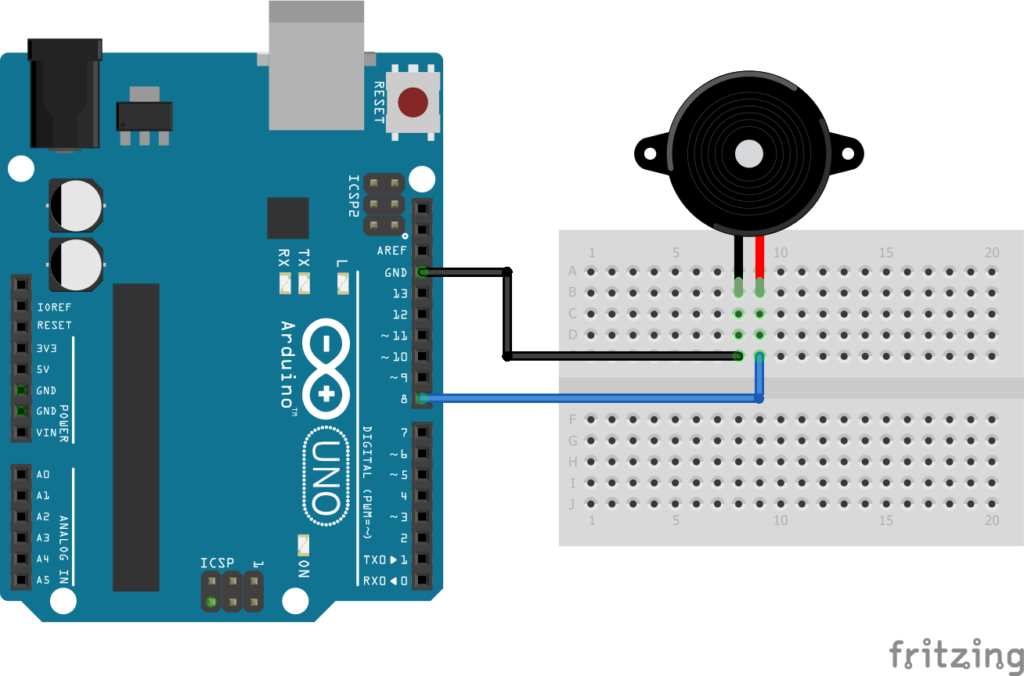
Explanation #
An active buzzer is very simple to use because it already contains an internal sound generator circuit.
Connect:
- Positive (+) pin of the buzzer to Arduino digital pin 8
- Negative (-) pin of the buzzer to GND
The Arduino controls the buzzer using: digitalWrite()
HIGH→ Buzzer ONLOW→ Buzzer OFF
We also use: delay() to control how long the buzzer stays ON and OFF.
In this project:
- The buzzer sounds for 1 second
- Stops for 1 second
- Repeats continuously
In simple words:
The Arduino repeatedly gives and removes power from the buzzer, creating an alarm sound.
Program #
int buzzerPin = 8;

void setup()
{
    pinMode(buzzerPin, OUTPUT);
}

void loop()
{
    digitalWrite(buzzerPin, HIGH);
    delay(1000);

    digitalWrite(buzzerPin, LOW);
    delay(1000);
}
Figure 1.2: Buzzer-Alarm Program
Code Explanation #
Defining the Buzzer Pin
int buzzerPin = 8;This variable stores the Arduino pin connected to the buzzer.
setup()
pinMode(buzzerPin, OUTPUT);This tells the Arduino that the buzzer pin will work as an output pin.
Turning the Buzzer ON :
digitalWrite(buzzerPin, HIGH);This sends 5V to the buzzer, causing it to produce sound.
Delay :
delay(1000);The Arduino waits for 1 second.
Turning the Buzzer OFF :
digitalWrite(buzzerPin, LOW);This removes power from the buzzer, stopping the sound.
Working Principle #
The Arduino continuously performs this sequence:
- Turn buzzer ON
- Wait for 1 second
- Turn buzzer OFF
- Wait for 1 second
- Repeat forever
This creates a repeating alarm sound.
Real-Life Applications #
Buzzers are used in many real electronic systems such as:
- Security alarms
- Doorbells
- Fire alarm systems
- Timer systems
- Home automation
- Electronic toys
- Industrial warning systems
- Vehicle reverse indicators
Beginner Tips #
- Make sure you are using an active buzzer for this simple project.
- If no sound is produced, check the buzzer polarity.
- Verify the wiring connections properly.
- Some buzzers produce low sound, so test in a quiet environment.
- Do not connect the buzzer directly to high voltage.
✔ Challenges / Next Steps #
- Create different alarm patterns.
- Add an LED with the buzzer.
- Use a button to activate the alarm.
- Connect an LDR for a dark detection alarm.
- Build a motion detection alarm using a PIR sensor.
- Generate musical tones using a passive buzzer.
Conclusion #
This project teaches how Arduino can control sound-producing devices using digital signals.
You learned:
- How a buzzer works
- How Arduino controls outputs
- Basic alarm system operation
- Timing and sound control
This project is a great introduction to:
- Alarm systems
- Notification systems
- Embedded electronics
- Interactive Arduino projects
Simple buzzer projects are widely used in real-world electronic devices and automation systems.


